Intro
What is AI and why are some many people worried about it. AI stands for artificial intelligence and it has gained media popularity due to its productivity benefits. It has also gained negative media popularity and that AI is causing companies to downsize or reduce its workforce. This article is meant to help IT professionals learn how to not just survive this new era but to thrive in it.
What’s All the Fuss About?
Resent headlines such as Amazon’s recent announcement of cutting 15,000 jobs which have been rumored to be linked to increased efficiencies in automation with gains possibly being linked to AI have caused a spike in worries of invidious losing their jobs to AI. There are also worries in the Computer Engineering/Coding fields of AI replacing low to mid level engineering jobs.
On the positive side, there are many benefits to be gained by harnessing the power of AI in your day to day workflows. For example, searching answers across many different data sources such as Slack, Email, Web, Files, and CRMs can be simplified with the use of AI platforms like CoPilot, Glean, or Claude. AI has the ability to automate mundane or even complex tasks that used to take hours and it can do it in minutes.
What Can be Done to Position Yourself Better?
The best way to position yourself in the AI era is to embrace it. This means research it, play around with it, and find new use cases. The use cases are literally endless and it will be the individuals who get creative with AI that will survive the AI job purge. Furthermore familiarize yourself with automation platforms such as Power Automate, Zapier, Make, etc.
Power Automate is my favorite automation platform and it supports no code automation flow programing. Power Automate is one of the earliest no code platforms and it allows you to create basic workflows fairly easily. I recommend checking out my mini series on Power Automate – How to Increase Productivity with Power Automate mini series to learn more about what you can do with this platform.
Most importantly, talk with your organizations information security team about any company specific acceptable use policies for AI. Some organizations have AI implementations like Copilot or Claude that may already have security policies implemented to prevent improper use. However, you should always use these general guidelines:
- Never use Personal Identification Information (PII) or confidential company/client information with a public LM, these should only be used in a corporate paid LM setting like Copilot or Glean that don’t use the information to train the system and use private LM installations.
- Before implementing an LM like Copilot, Glean, or Claude at work, always consult your information security team first so the solution can be properly vetted and implemented securely.
- Most importantly, always take what AI gives you with a grain of salt, trust but verify the information.
How to Make AI Work for You
Use creative prompts…
What is a prompt?
An AI prompt is a command for AI to take action with a set of input/data on a set of specific instructions created by the user.
For example, say you have an excel sheet with a table that has hundreds and maybe even thousands of records. You can upload that file, then ask the AI agent any question you want about the data.
For Example:
Can you create a pie chart that shows the total number of candidates from each recruiting source?
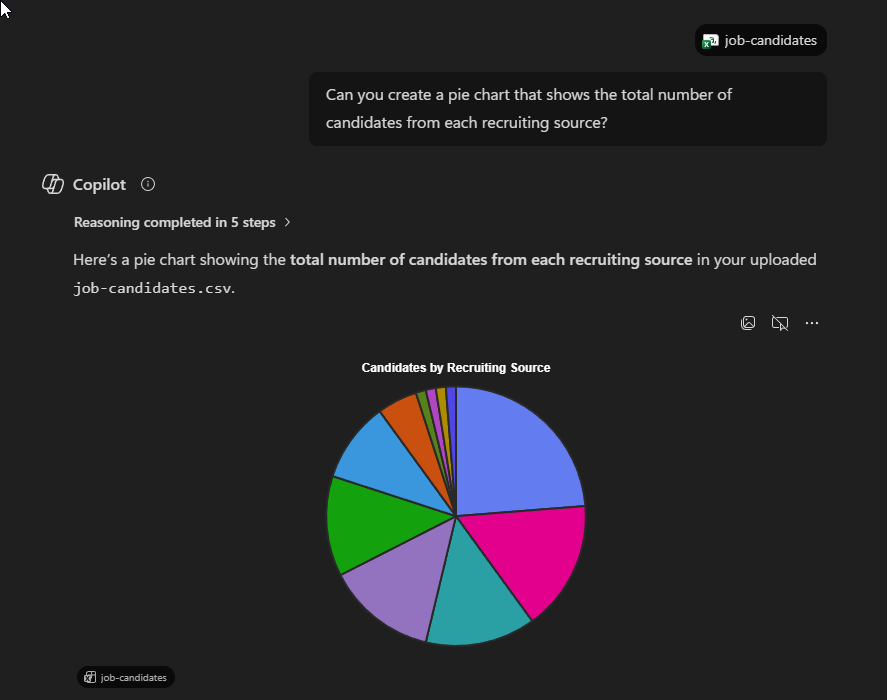
When thinking of creating use cases, try to frame your thinking in the context of how can AI help me find faster answers to questions? and how can AI reduce the amount of time and effort it takes to chunk through mundane work? Keeping these two main contexts in mind can help maximize your return on investment when coming up with new use cases.
For Example:
Working in IT has its fair share of mundane work. For example, network engineers who work for a manage service provider often have to perform network discovery before they can deploy their organizations network stack at client sites. This involves chunking through very long and sometimes mind numbing configuration dump files from switches and firewalls to try to make sense of the network. You can use a corporate AI installation to securely chunk through this information to list out VLANs, subnets, network devices and device types such as locating audio visual devices on the network or security devices. Something that would normally take hours of work can now be done within minutes using a solid corporate AI platform like Copilot using the work tab as shown below.
Note: it is important to use the Work tab in Copilot when working with confidential data.

Conclusion
AI is not the end of IT careers—it is a turning point. While headlines about automation and workforce reductions have fueled uncertainty, the reality is that AI offers unprecedented opportunities for those willing to adapt. By embracing AI tools, learning automation platforms, and developing strong prompting and critical‑thinking skills, IT professionals can dramatically increase their efficiency and value. When used responsibly and securely, AI transforms hours of repetitive work into minutes of insight, allowing professionals to focus on higher‑impact problem solving. Those who choose to explore, experiment, and innovate with AI will not only survive this new era, but position themselves to thrive as technology—and the workplace—continues to evolve.